Our Location
304 North Cardinal St.
Dorchester Center, MA 02124

304 North Cardinal St.
Dorchester Center, MA 02124

Secure Shell (SSH) is a cryptographic network protocol that is used to log into the system via a secure channel. With the help of SSH, you can safely exchange data between two devices. For more detailed information, visit here.
Enabling SSH access allows for:
However, there are some downsides with enabling SSH:
The Manage Shell plugin provided by Namecheap allows you to enable or disable SSH access for your respective Shared Hosting accounts (except Reseller Hosting, VPS, and Dedicated servers) with just a few clicks.
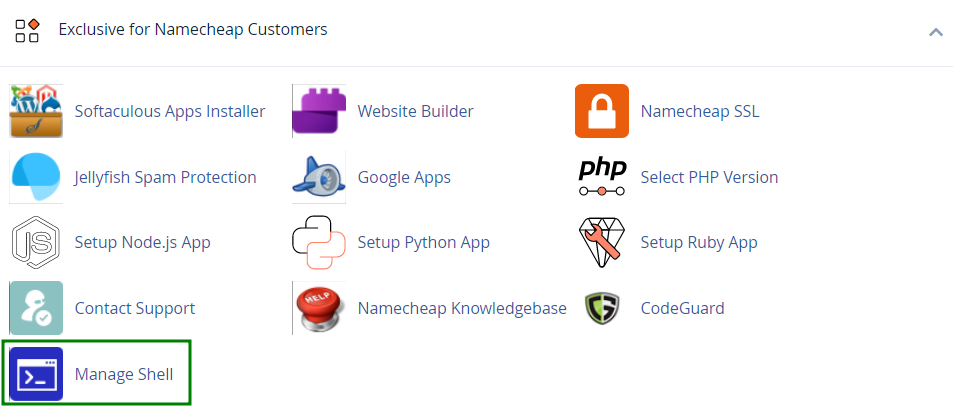
Firstly, locate the Manage Shell plugin from your cPanel: cPanel >> the Exclusive for Namecheap Customers section >> Manage Shell:
By default, SSH access is disabled for hosting accounts.
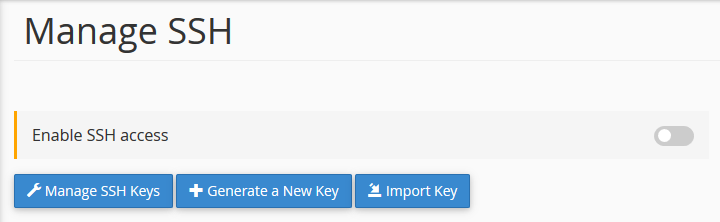
There are 3 options related to enabling SSH keys:
All these options will take you to the SSH Access menu in your cPanel. Detailed instructions can be found in this guide.
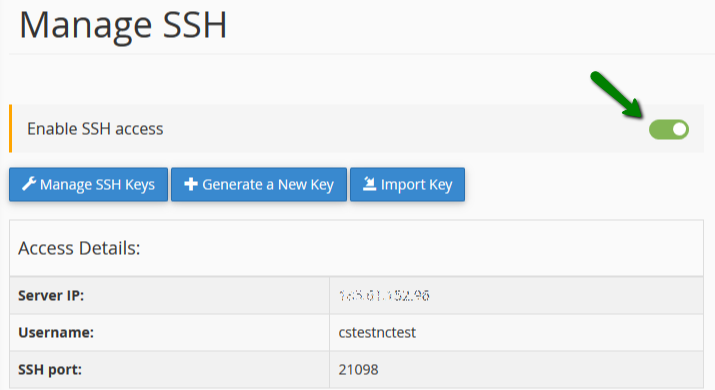
To enable SSH, turn the toggle button on. After it has been enabled, you will then see how you can manage your SSH.
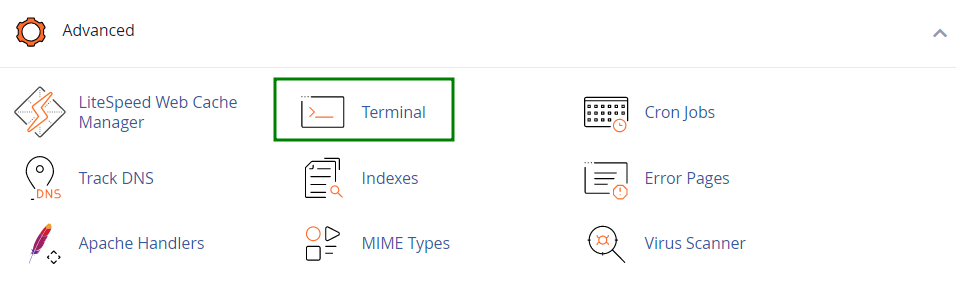
Once SSH is enabled, the Terminal menu will appear in cPanel, in the Advanced section.
Feel free to explore more about SSH clients here.