Our Location
304 North Cardinal St.
Dorchester Center, MA 02124

304 North Cardinal St.
Dorchester Center, MA 02124

| Table of Contents |
|---|
| 1Installing Import Manager 1.1Performing an Import 1.2Cleaning Up |

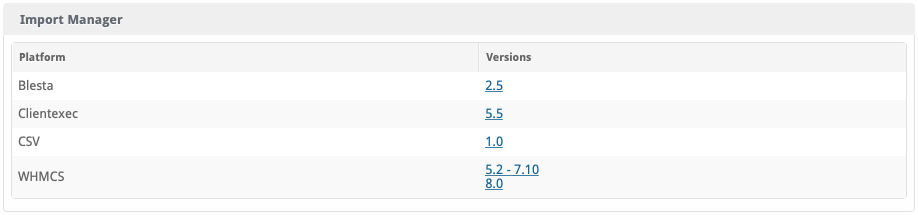
To perform an import, click the “Manage” button for the Import Manager plugin under [Settings] > [Company] > [Plugins] > Installed. You should see the Import Manager product selection page.
It is strongly recommended that you follow the Migration Guide to start and complete your import using this plugin.
Import via CLI
To import via cli navigate to the root directory of your Blesta installation and execute the following command
php index.php admin/plugin/import_manager/admin_manage_plugin/index |
Import via CLI Scripted
To import via cli navigate to the root directory of your Blesta installation and execute the following command to script the import using WHMCS v8+
php index.php admin/plugin/import_manager/admin_manage_plugin/index --type whmcs --version 8.0 --host DBHOST --database DBNAME --user DBUSER --pass DBPASS --key CCENCRYPTIONHASH --balance_credit y --enable_debug y |
Replace
Use the -h switch to show all options: php index.php admin/plugin/import_manager/admin_manage_plugin/index -h
After the import has completed successfully, you may safely uninstall the Import Manage plugin by clicking the “Uninstall” button for the plugin under [Settings] > [Company] > [Plugins] > Installed.