How to increase WordPress memory limit

In order to increase WordPress memory limit follow these steps:

1. Go to cPanel Files section > File manager menu:

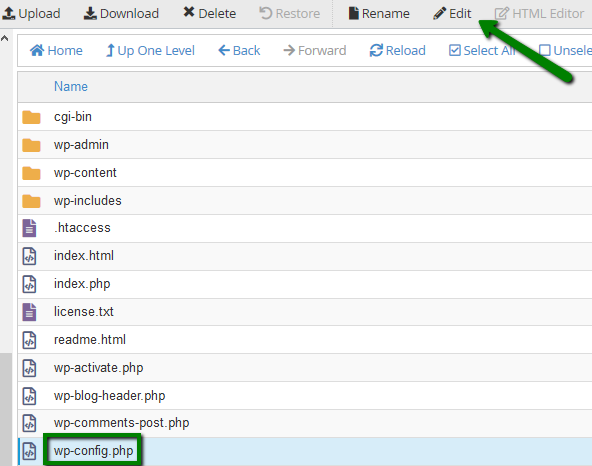
2. Navigate to the root folder of your domain (by default, it is public_html for the main domain and addondomain.tld for the addon domains). Select wp-config.php file and click Edit:
Add the following code right before the /* That’s all, stop editing! Happy blogging. */’ line:

define( 'WP_MEMORY_LIMIT', '512M' );

where 512 is the memory limit you want to set: 


NOTE: 
it is also possible to change WP_MEMORY_LIMIT by going to wp-includes folder of the installation and editing default-constants.php file.

That’s it!

  • 0 Пользователи нашли это полезным
Помог ли вам данный ответ?

Связанные статьи

How to Create a WordPress Staging Site

WordPress, although the most popular blogging software with thousands of users, somehow fails to...

How to fix WordPress blank page (white screen)

The white screen (blank page) is one of the most common errors that occur in WordPress. In this...

How to deal with the hacked WordPress website?

In this article, we’ll cover the most common cases of WordPress hacks, how to spot them, and the...

How to change upload filesize limit in WordPress multisite

The upload file size limit controls the size of a single file that can be uploaded via any means...

How to add a favicon to a WordPress website

Favicon (also called site icon) is a small image that appears next to your website title in the...
